This is default featured slide 1 title

Go to Blogger edit html and find these sentences.Now replace these sentences with your own descriptions.This theme is Bloggerized by Lasantha Bandara - Premiumbloggertemplates.com.

This is default featured slide 2 title

Go to Blogger edit html and find these sentences.Now replace these sentences with your own descriptions.This theme is Bloggerized by Lasantha Bandara - Premiumbloggertemplates.com.

This is default featured slide 3 title

Go to Blogger edit html and find these sentences.Now replace these sentences with your own descriptions.This theme is Bloggerized by Lasantha Bandara - Premiumbloggertemplates.com.

This is default featured slide 4 title

Go to Blogger edit html and find these sentences.Now replace these sentences with your own descriptions.This theme is Bloggerized by Lasantha Bandara - Premiumbloggertemplates.com.

This is default featured slide 5 title

Go to Blogger edit html and find these sentences.Now replace these sentences with your own descriptions.This theme is Bloggerized by Lasantha Bandara - Premiumbloggertemplates.com.

Showing posts with label linux_tips_and_help. Show all posts

How to Create Bootable Ubuntu CD or USB Disk

Ubuntu Extraction MethodIt’s Very Easy than Windows in Ubuntu to Create a Bootable Ubuntu CD or USB Stick. Without Using Any Software You can Create Bootable Ubuntu CD. Just You Need a Ubuntu ISO File. You can Install it beside Windows or Try it without Install. As a Freeware Operating System We Need to Support it. Because it’s Give Us Full Access in Operating System. The Best Great Advantage in Ubuntu its Completely Virus Free, Which is the Most Anxious Matter for Windows.
How to Create Bootable Ubuntu CD -  
⇒ If You don’t have a Ubuntu ISO File, You can Download Latest Version (11.04) Ubuntu from Official Site. Download Link. 
⇒ Find Your Ubuntu ISO File. You Need to Extract it. If you have Winrar Software it will be best to extract it or you can Use Any Other Extraction Software. 
⇒ Extract Ubuntu ISO File in a Specific Folder and Give it’s Name “Bootable Ubuntu” (Name isn’t a Matter, You can Give Any Name).
⇒ Now Extract Ubuntu ISO File.
For Bootable UBUNTU USB Disk –
⇒ Input a USB Disk in Your System which have Minimum 2GB Capacity. 
⇒ Format it with Your Desired Name. Ensure it you have No Virus in Your USB Disk.
⇒ Go Inside “Bootable Ubuntu” (In My Case) or Which Name You Gave Folder. 
⇒ Select All Extraction File and Copy it Inside Ur USB Disk.
Ubuntu Extraction Method[Caution – don’t copy the Extraction Folder, copy all extraction file which have inside folder. If you copy folder inside USB disk or CD, you can’t boot UBUNTU] 
⇒ Now Your USB Disk is Ready to Install Ubuntu from Boot Menu. 
⇒ Restart Your PC and Select USB Mode from Boot Option. Now you can Install Ubuntu.
For Bootable UBUNTU CD – 
⇒ This is Not Differ from Above Method.
⇒ You Just Need to Burn All Extraction File (Without Folder, I Say Details in Above) Using Any Burning Software (Nero is Recommended). 
⇒ Now Restart Your PC and Give CD Mode from Boot Option.
[I Test it on UBUNTU 11.04 (Latest) Version]

How can I Change Ubuntu (Linux) Default Setting

Ubuntu ThumbanailsWhen You Install Ubuntu (Linux) in Your PC by Default You can't Access Many thing (Like Internet, Connect With Ur Printer, Connect to Wireless Network....). You Need to Change Ur Default Setting . Specially Internet  Connection is So Important. Without Internet Connection You can't Feel Ubuntu Properly. If You have a LAN Connection You have Nothing Need to do Anything.
Process of Change Ubuntu Default Setting: 
Ur User Name⇒ Open Ur Ubuntu System.
⇒ Click on Top “System” Menu. 
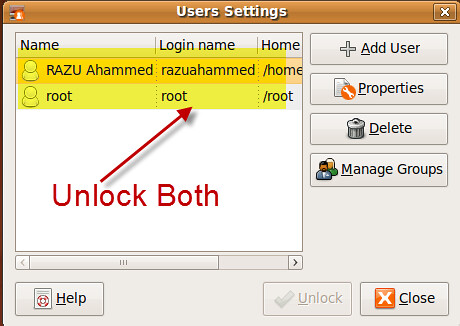
⇒ Now Go “Administration” to “Users and Groups”.
⇒ Unlock Ur User Name by Ur Password (link-Folder) 
⇒ Also do it for “ROOT” User.
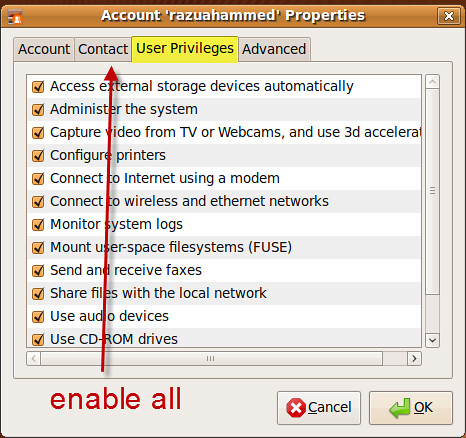
Select All⇒ Now Click “Properties” and Go “User Privileges” Tab
⇒ Select Everything and Press OK.
⇒ Restart Ur PC. Now You can Connect with Internet (LAN) Without Giving Any Setting. It's Active By Default and Also Active Others Feature.